

SOC 2 Reports
Generate auditor-ready SOC 2 compliance reports
Why SOC 2 Matters
SOC 2 compliance is often required for:
- Enterprise sales - 60% of companies prefer SOC 2-certified vendors
- Investor requirements - VCs increasingly require SOC 2 for portfolio companies
- Customer trust - Demonstrates your commitment to security
- Competitive advantage - Unblock deals that competitors can't close
Penetration Testing in SOC 2
SOC 2 Trust Services Criteria requires penetration testing:
CC4.1 - Monitoring Activities
The entity continuously monitors the system, including penetration testing, to identify changes that may significantly affect internal control effectiveness.
CC7.1 - Vulnerability Management
The entity has implemented vulnerability management procedures to identify, evaluate, and address vulnerabilities in a timely manner.
ModernPentest satisfies both requirements with continuous automated testing and comprehensive reporting.
Generating a SOC 2 Report
- Navigate to Reports in the dashboard
- Click Generate Compliance Report
- Select the SOC 2 framework (ISO 27001 is also available — see ISO 27001 Reports)
- Select the application(s) to include
- Choose the date range (typically your audit period)
- Click Generate
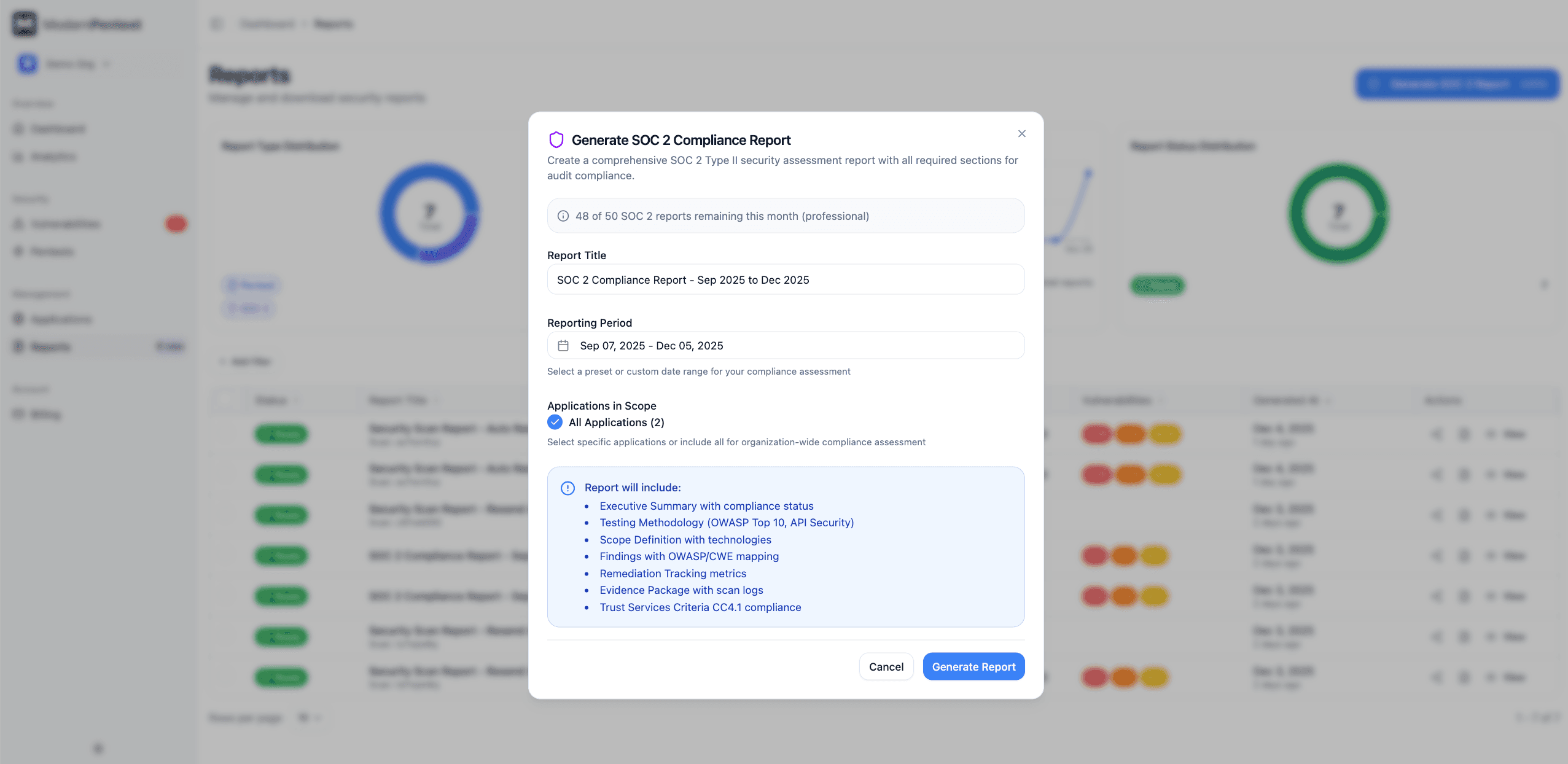
Reports typically generate within 2-3 minutes. You'll receive an email notification when ready.
Understanding Your SOC 2 Report
Once generated, your report contains seven detailed sections. Use the navigation bar at the top of the report to jump between sections.
Executive Summary
The executive summary provides a high-level overview of your security posture:
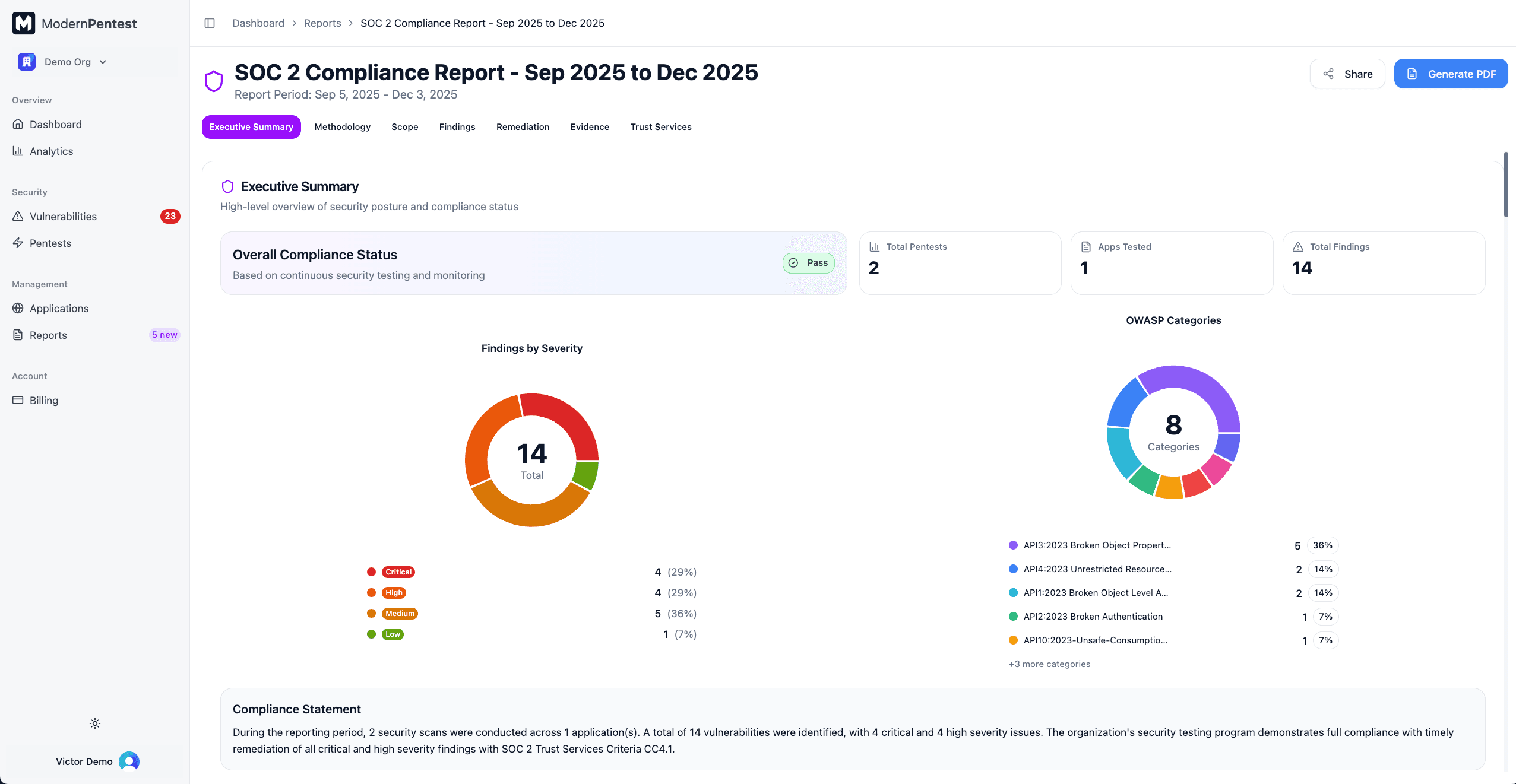
- Compliance Status Badge - Overall PASS, FAIL, or CONDITIONAL_PASS status
- Key Metrics Cards - Total pentests, applications tested, and findings count
- Severity Distribution Chart - Donut chart showing Critical/High/Medium/Low breakdown
- OWASP Categories Chart - Top vulnerability categories discovered
- Compliance Statement - Narrative summary of your compliance posture
Testing Methodology
This section documents how testing was performed:
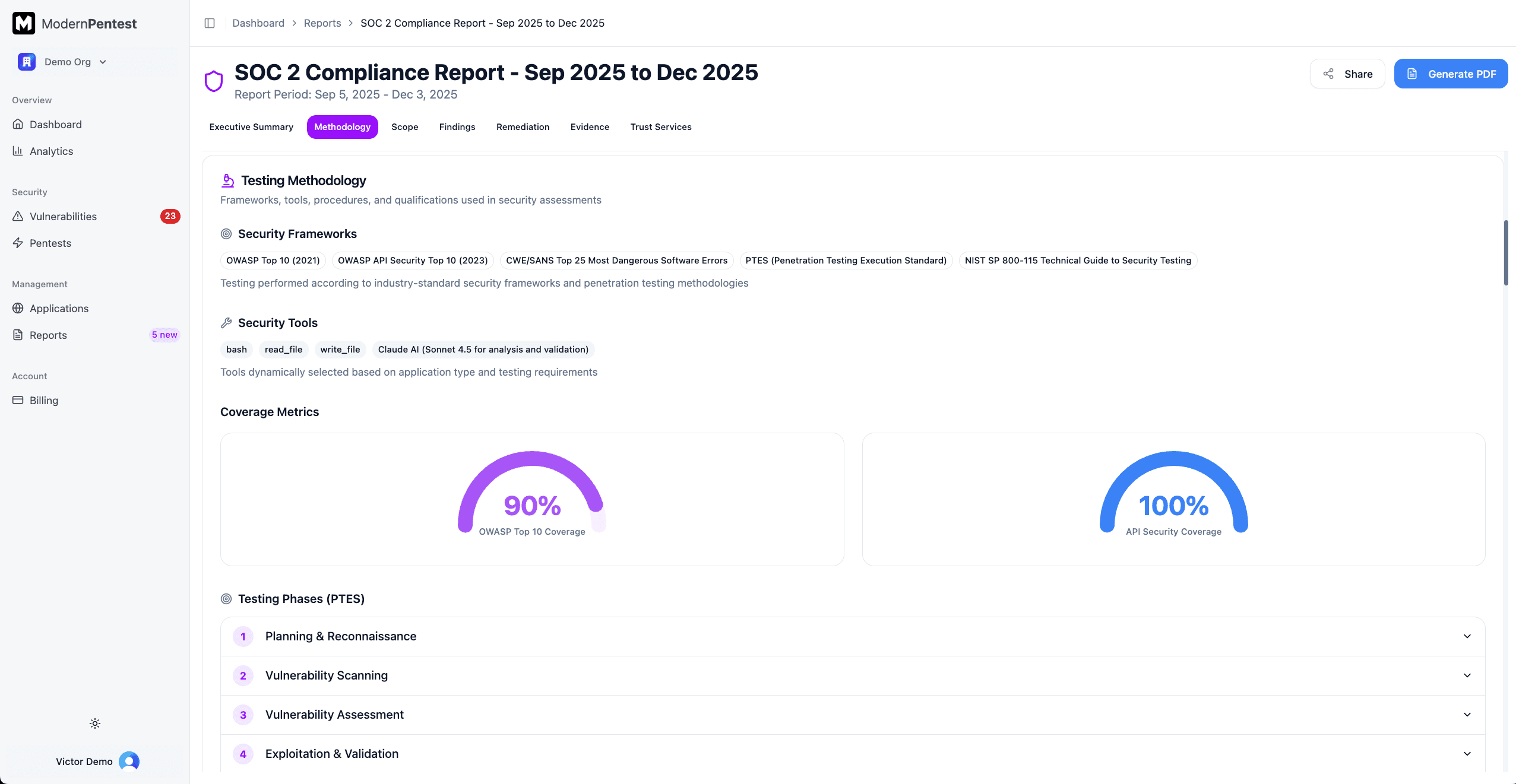
- Security Frameworks - Standards followed (NIST, OWASP, etc.)
- Security Tools - Tools used (nmap, nuclei, sqlmap, etc.)
- Coverage Gauges - Visual meters showing OWASP Top 10 and API Security coverage percentages
- Testing Phases - Expandable accordion showing each phase (Reconnaissance, Scanning, Exploitation, etc.) with techniques used
- Testing Schedule - Table of applications with their testing frequency (Daily/Weekly/Monthly)
- Severity Classification - Criteria for Critical, High, Medium, and Low ratings
- Validation Process - Automated and manual verification steps, including false positive rate
- Limitations - Scope boundaries and testing constraints
Scope Definition
The scope section defines what was tested:
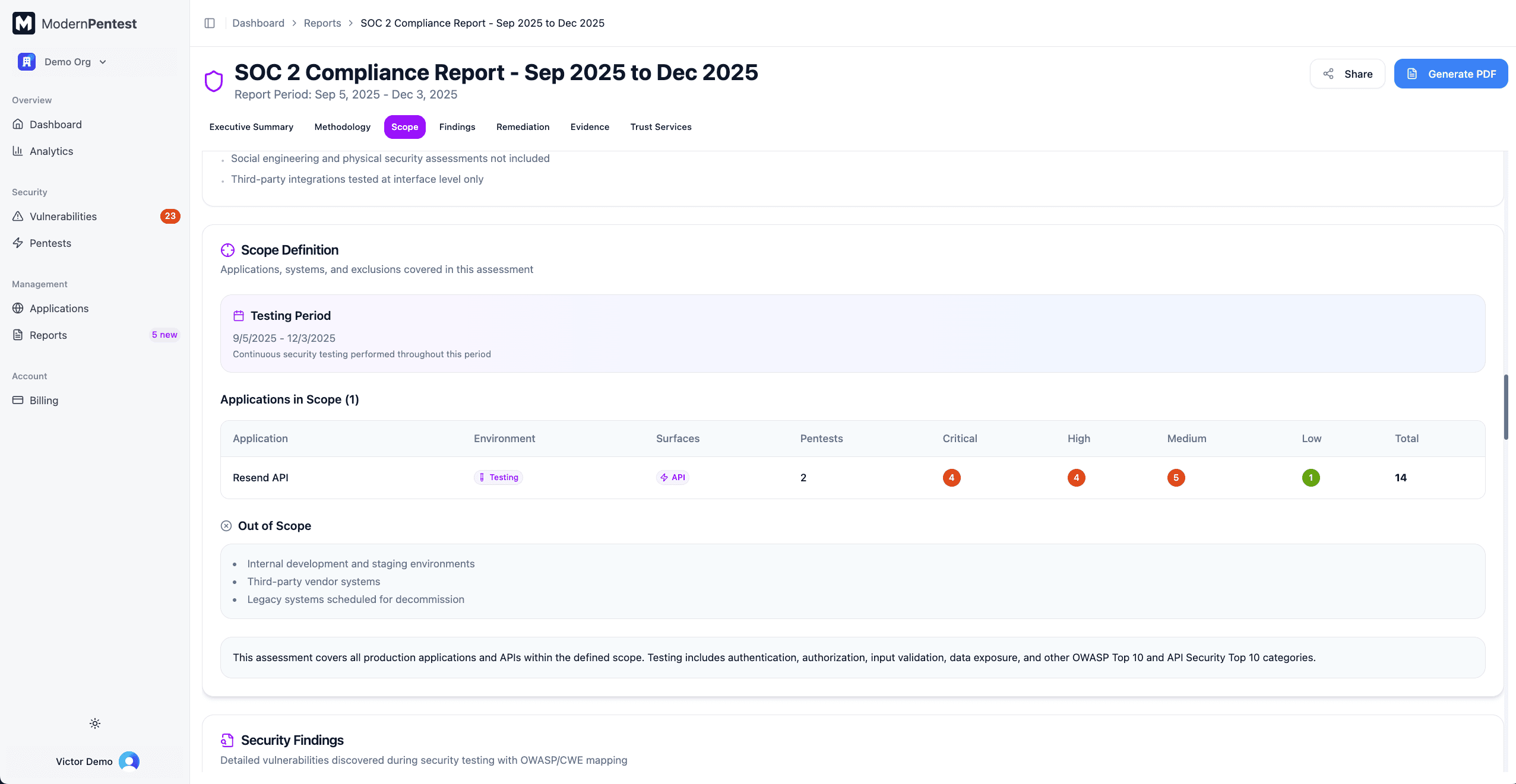
- Testing Period - Start and end dates for the audit period
- Applications Grid - Interactive table showing:
- Application name
- Environment (Production, Staging, Development)
- Attack surfaces (Web, API, Mobile)
- Number of pentests performed
- Vulnerability counts by severity
- Out of Scope Items - Systems or components excluded from testing
- Scope Statement - Narrative defining the testing boundaries
Security Findings
The findings section provides detailed vulnerability information:
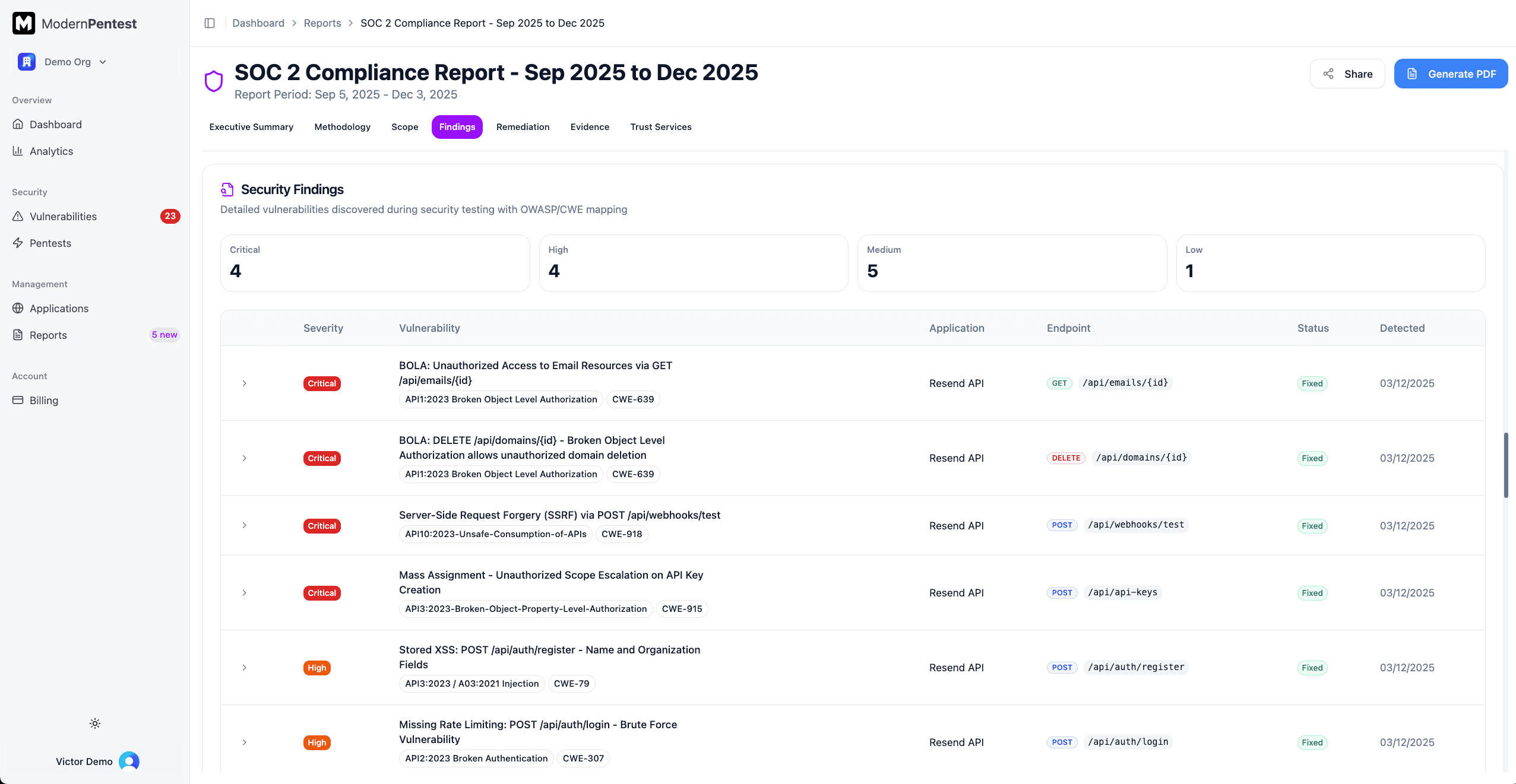
- Severity Summary Cards - Count of Critical, High, Medium, and Low findings
- Findings Data Grid - Expandable table with:
- Severity badge
- Vulnerability title with OWASP and CWE references
- Affected application and endpoint
- Current status
- Detection date
Click any row to expand and view:
- Evidence Summary - Proof of the vulnerability
- Business Impact - Potential consequences
- Proof of Concept - Code block demonstrating the issue
- Remediation Guidance - Steps to fix the vulnerability
Remediation Tracking
Track your team's progress on fixing vulnerabilities:
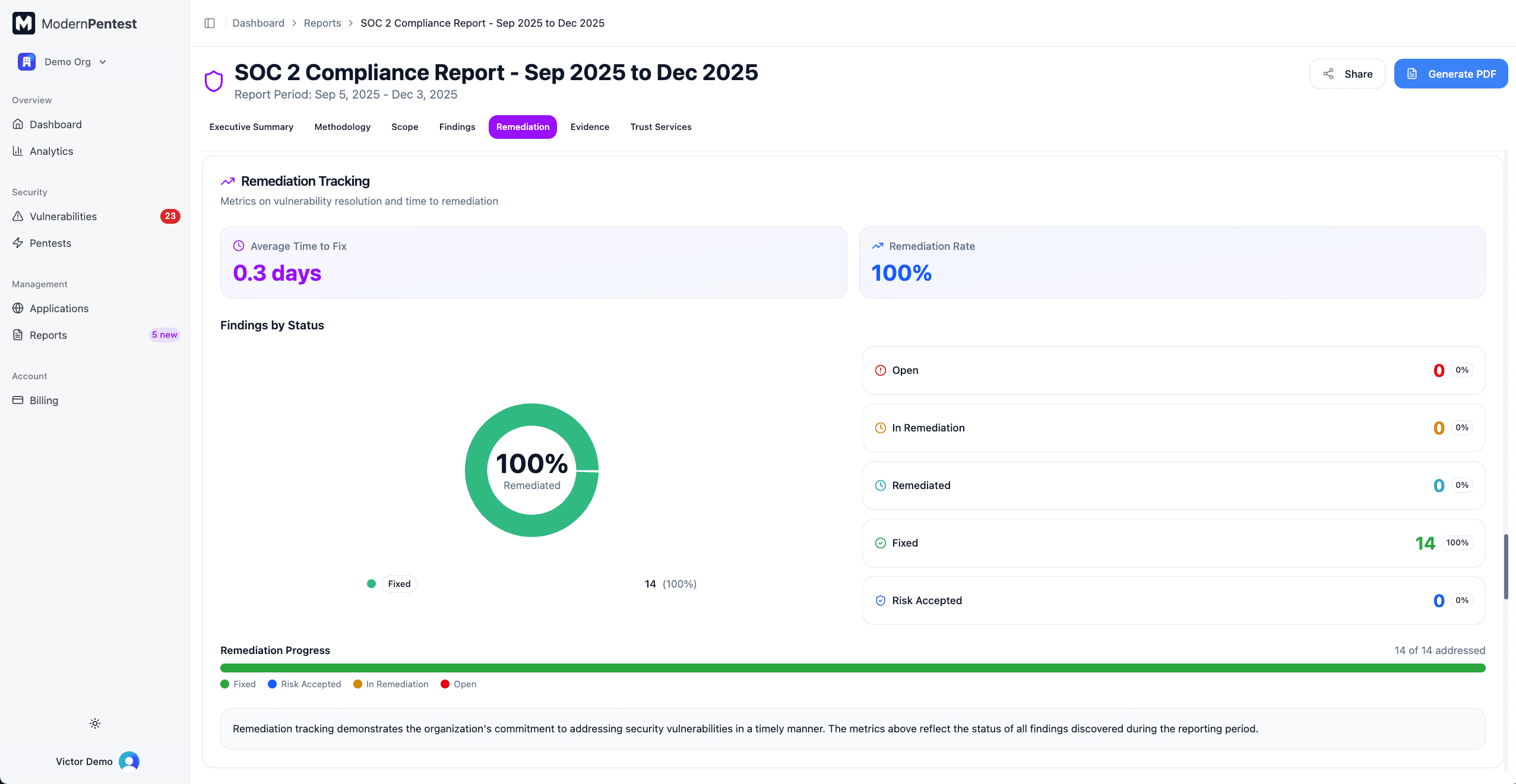
- Key Metrics
- Average Time to Fix (days)
- Remediation Rate (percentage of resolved findings)
- Status Distribution Chart - Pie chart showing:
- Open (unaddressed)
- In Remediation (work in progress)
- Remediated (fix applied, awaiting verification)
- Fixed (verified resolved)
- Risk Accepted (acknowledged and accepted)
- Progress Bar - Multi-colored bar showing remediation progress at a glance
- Commentary - Narrative about your remediation commitment
Evidence Package
Auditors need evidence that testing occurred. This section provides:
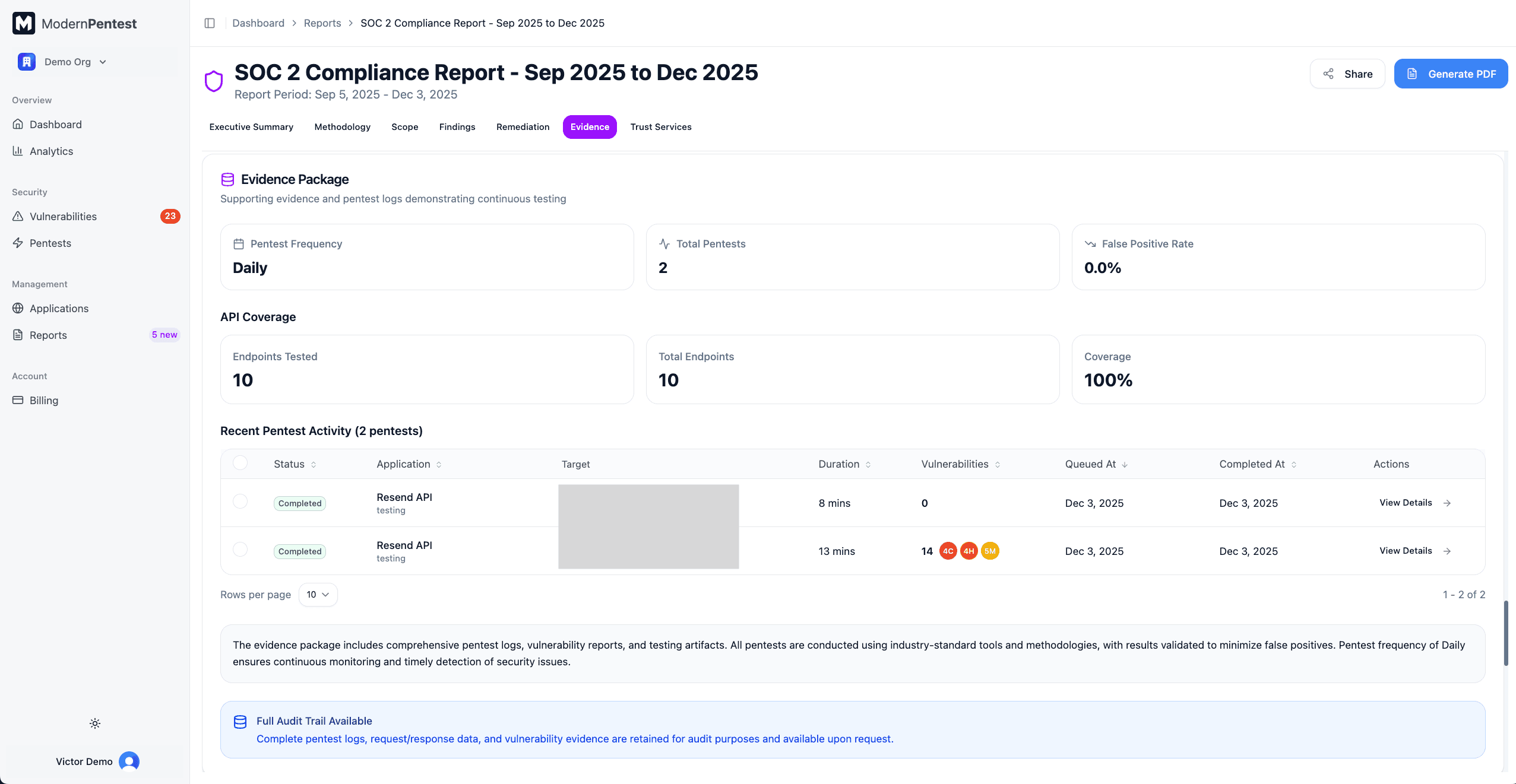
- Testing Frequency - How often pentests run
- Total Pentests - Number of pentests during the audit period
- False Positive Rate - Accuracy metric for findings
- API Coverage (if applicable) - Endpoints tested vs. total endpoints
- Recent Pentest Activity - Table of recent scans showing:
- Status and application name
- Target URL and scan type
- Duration and timestamps
- Vulnerability results by severity
- Audit Trail - Complete logs are retained and available upon request
SOC 2 Readiness Assessment
This section evaluates your readiness for SOC 2 certification:
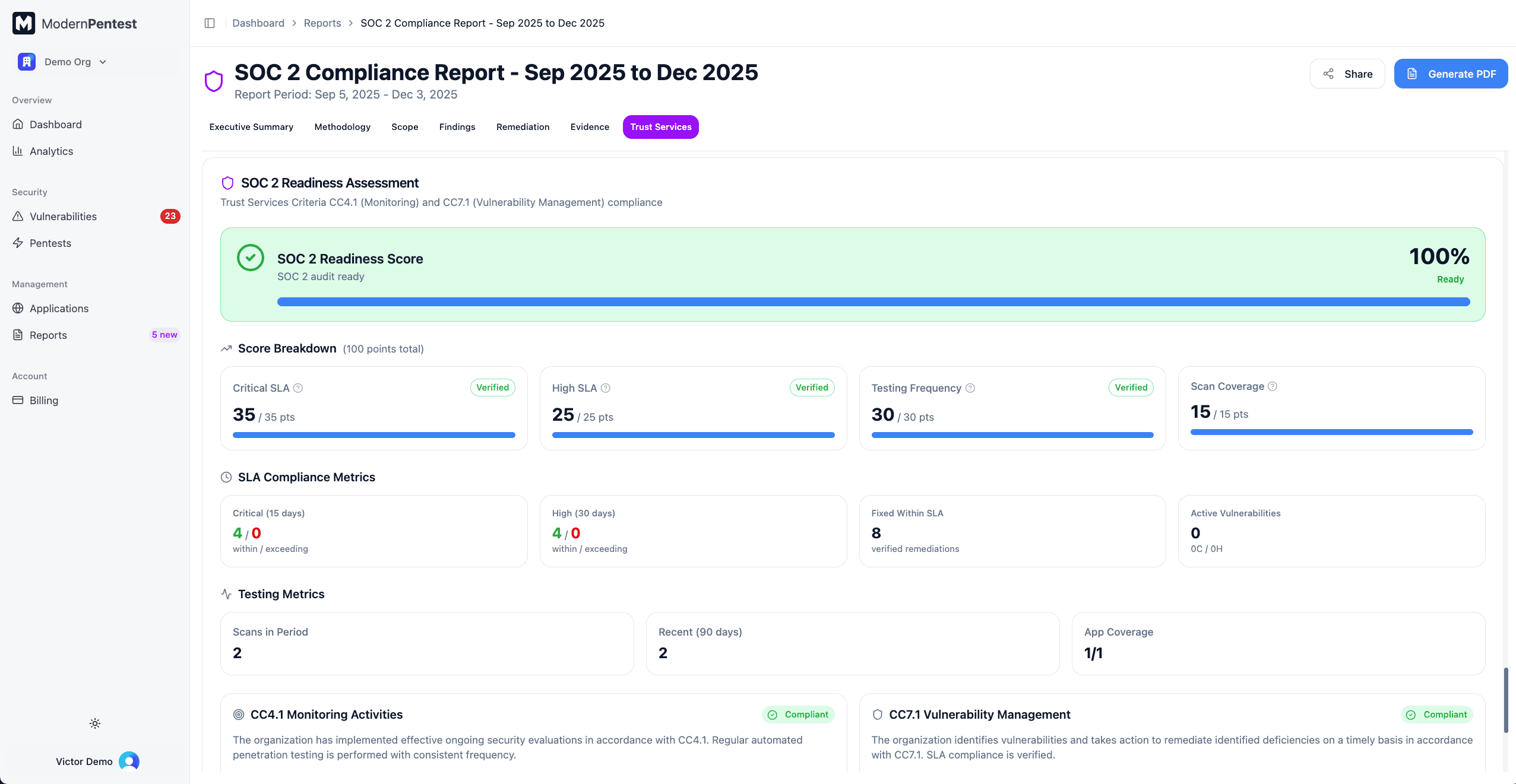
Readiness Score
Your overall readiness is displayed as a percentage (0-100%) with a status level:
| Status | Meaning |
|---|---|
| Ready | You meet the requirements for SOC 2 compliance |
| At Risk | Some issues need attention before certification |
| Not Ready | Significant gaps must be addressed |
| Establishing Baseline | Initial testing in progress, insufficient data |
Score Breakdown (100 Points)
Your readiness score is calculated from four components:
| Component | Points | What It Measures |
|---|---|---|
| Critical SLA Score | 35 | Remediation of critical vulnerabilities within SLA timeline |
| High SLA Score | 25 | Remediation of high vulnerabilities within SLA timeline |
| Testing Frequency Score | 30 | Regular, consistent scanning cadence |
| Scan Coverage Score | 15 | All applications scanned within 90 days |
Each component shows points earned, total available, and a progress bar.
Compliance Blockers
Critical issues that prevent certification are highlighted:
- What triggers a blocker: Critical/high severity vulnerabilities exceeding SLA, or missing required testing
- How to resolve: Address the listed issues and re-run your pentests
SLA Compliance
Track whether vulnerabilities are remediated within acceptable timeframes:
- Critical Vulnerabilities - Count within SLA vs. exceeding SLA
- High Vulnerabilities - Count within SLA vs. exceeding SLA
- Fixed Within SLA - Verified remediations meeting timeline requirements
Trust Services Criteria
Detailed compliance cards for:
- CC4.1 (Monitoring Activities) - Status, statement, and evidence checklist
- CC7.1 (Vulnerability Management) - Status, statement, and evidence checklist
This section measures only CC4.1 and CC7.1 criteria. Full SOC 2 certification requires additional controls (access control, incident response, change management). Consider platforms like Vanta or Drata for complete compliance management.
Reading Your Report
Quick reference for interpreting report data:
Severity Levels
| Severity | Color | Meaning |
|---|---|---|
| Critical | Red | Immediate exploitation risk, requires urgent action |
| High | Orange | Significant risk, address within days |
| Medium | Amber | Moderate risk, address within weeks |
| Low | Lime/Green | Minor risk, address as time permits |
Compliance Status
| Status | Meaning |
|---|---|
| PASS | Meets all SOC 2 requirements |
| CONDITIONAL_PASS | Meets requirements with noted exceptions |
| FAIL | Does not meet requirements, action needed |
Remediation Status
| Status | Meaning |
|---|---|
| Open | Vulnerability identified, not yet addressed |
| In Progress | Actively being remediated |
| Remediated | Fix applied, awaiting verification |
| Fixed | Verified resolved |
| Risk Accepted | Acknowledged and accepted by stakeholder |
Sharing Your Report
Share Link
Click the Share button in the report header to copy a shareable URL to your clipboard. Share this link with auditors or team members who need access.
PDF Download
Click Download PDF to generate a professional PDF document. This button is available once the report status is "completed."
PDF generation may take a moment for large reports with many findings.
Auditor FAQ
Common questions auditors ask and how ModernPentest addresses them:
"Is this automated testing acceptable?"
Yes. SOC 2 doesn't mandate manual penetration testing. Automated continuous testing often provides better coverage than annual manual assessments. Our methodology is documented and consistent.
"How do you ensure testing accuracy?"
We maintain a less than 5% false positive rate through:
- AI-powered validation
- Evidence-based findings
- Proof-of-concept verification
"What vulnerabilities do you test for?"
Complete OWASP Top 10 (2021) and OWASP API Top 10 (2023) coverage, plus:
- Platform-specific checks (Supabase, Firebase, Vercel)
- Business logic vulnerabilities
- Authentication and authorization flaws
"How often is testing performed?"
Configurable based on your needs:
- Daily quick pentests for continuous monitoring
- Weekly standard pentests for comprehensive coverage
- On-demand deep pentests before releases
"Can you provide evidence of testing?"
Yes. Each report includes:
- Detailed pentest logs
- Request/response evidence
- Screenshots where applicable
- Timeline of all testing activities
Best Practices for Audits
- Test regularly during the audit period - Run at least weekly pentests
- Address findings promptly - Auditors look at remediation timelines
- Document risk acceptances - Explain any findings you've accepted
- Maintain consistent coverage - Test all applications in scope
- Generate reports early - Review before your audit window closes
Auditor Support
Need help with your audit? We offer:
- Report Review - We can review your report format with your auditor
- Custom Mapping - Adjust criteria mapping for your specific audit
- Evidence Packages - Additional documentation if requested
Contact support@modernpentest.com for assistance.
Next Steps
- Generate an ISO 27001 report in parallel if you're pursuing dual certification
- Set up continuous monitoring for ongoing compliance
- Configure integrations for remediation workflow
- Learn about our testing methodology
Last updated: September 7, 2026