

Adding Applications
Register your product and configure attack surfaces for security testing
An application represents a single product or service with a unified backend. Register one application per product, not separate entries for your web dashboard and API. For more details, see Core Concepts: Application.
Choose your setup
With your coding agent (recommended): connect from the repository and let it discover the deployed URLs, authentication and OpenAPI specification, then prepare dedicated test users through your own tooling. You review the setup and approve the scan before it starts. Read Enroll from your repository, or start the agent setup in the dashboard.
Manually: set up manually opens the full setup wizard described below. Configure application details, surfaces, authentication and scheduling step by step. Configure test accounts and any sign-in code source before proving ownership if you requested an automatic first pentest.
Advanced manual setup
Application Basics
Start by providing basic information about your application:
- Name - A friendly identifier for your product (e.g., "Production App", "Staging Environment")
- Description - Optional context for your team
- Environment - Select the deployment environment:
| Environment | Description | Default Testing |
|---|---|---|
| Production | Live customer-facing systems | Active (safe checks only) |
| Staging | Pre-production testing environment | Aggressive (includes exploitation) |
| Development | Local or dev environments | Aggressive (includes exploitation) |
The environment you select affects the default testing intensity. Production environments use safer testing by default to avoid service disruption.
Select Attack Surfaces
Choose which interfaces of your application to test:
| Surface | When to Enable |
|---|---|
| Web Application | Your product has a user-facing website or web app |
| REST API | Your product exposes REST/GraphQL endpoints |
Most modern SaaS products have both surfaces: a web dashboard and an API that share users, data, and business logic. Enable both for complete coverage.
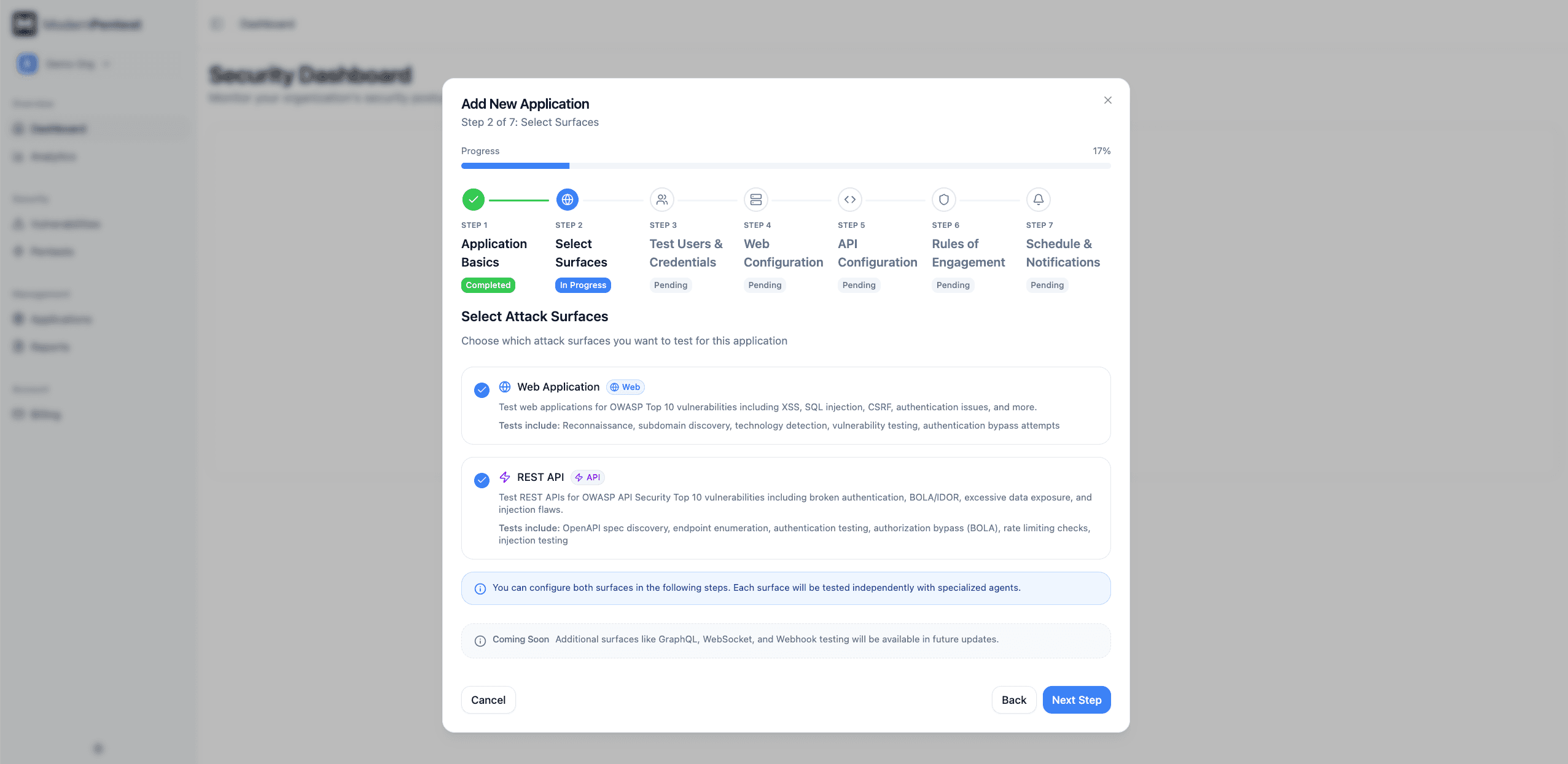
At least one surface must be selected. Your selection determines which configuration steps appear next.
Test Users & Credentials
Test users are defined once and shared across all surfaces. This enables consistent authorization testing across your web app and API.
Authentication Strategy:
| Strategy | Description | Best For |
|---|---|---|
| Public | No authentication required | Public-facing apps without login |
| Pre-configured | Provide existing test accounts | Most applications (default) |
| Open Registration | Agents create accounts automatically | Coming soon |
Adding Test Users:
For pre-configured authentication, add one or more test accounts:
- Email - Where sign-in codes are sent, and the login identifier for most apps
- Username (optional) - When your login form takes a username rather than the email
- Password - Account password, if the account uses one
- Role - User role for authorization testing (e.g., "admin", "user", "viewer")
How does this account sign in?
Each account declares its login method, because guessing costs a whole scan:
| Login method | What it means |
|---|---|
| Password only | Email/username and a password. Nothing else. |
| One-time code only | No password; a magic link or emailed code is the sign-in |
| Password + one-time code | Password first, then a second-factor code |
If the account needs a code, you choose where we get it: a scanner mailbox we generate for you, an authenticator secret (TOTP), or a fixed test code.
Setting up passwordless login, 2FA, or magic links? See Test User Authentication for the full walkthrough, verification steps, and troubleshooting.
Use dedicated test accounts with realistic permissions. Never use production admin credentials or real user accounts.
Why shared users? The same credentials test both web login and API authentication, enabling cross-surface authorization testing. For example, we can verify that a "user" role can't access admin endpoints on both the web app and API.
Web Surface Configuration
This step appears if you selected Web Application.
Configure how we access your web application:
Application URL
Enter the root URL of your web app (e.g., https://app.yourcompany.com)
The host of this URL is one of the hosts you prove ownership of after saving (see the last step).
Authentication Strategy:
| Strategy | Description |
|---|---|
| Public | No authentication needed for testing |
| Shared Users | Uses credentials from Test Users step (recommended) |
| Custom | Web-specific credentials different from shared users |
For most applications, Shared Users is recommended: it uses the test accounts you configured in the previous step and enables cross-surface testing.
REST API Configuration
This step appears if you selected REST API.
Configure your API for testing:
Base URL
Enter your API's root URL (e.g., https://api.yourcompany.com)
Its exact host is proven separately from the web host, including when both are under the same domain. If the URLs use the same host, one proof covers both.
OpenAPI Specification
Providing your OpenAPI spec enables deeper testing. Choose how to provide it:
| Method | Description |
|---|---|
| Auto-discover | We scan 30+ common paths (/openapi.json, /swagger.json, etc.) |
| URL | Direct link to your spec |
| Upload | Upload a JSON or YAML file (max 5MB) |
| Paste | Copy and paste spec content |
Don't have an OpenAPI spec? Select auto-discover; we can still test your API through reconnaissance, but coverage will be more limited.
Authentication Strategy:
| Strategy | Description |
|---|---|
| Public | No authentication needed |
| Shared Users | AI discovers your auth flow using test credentials (recommended) |
| Static | Manual credential configuration |
For Static authentication, choose your auth type:
- API Key - Header name and value
- Bearer Token - JWT or access token
- OAuth 2.0 - Token URL, client ID, secret, and scope
- Basic Auth - Username and password
Rules of Engagement
Configure how aggressively we test your application:
Testing Intensity:
| Level | Description | Recommended For |
|---|---|---|
| Passive | Reconnaissance only, no active testing | Sensitive production systems |
| Active | Safe vulnerability checks | Production environments |
| Aggressive | Includes exploitation attempts | Staging and development |
Testing intensity is auto-set based on your environment selection, but you can override it here.
Test Types:
| Type | Description | Default |
|---|---|---|
| Recon | Asset discovery and mapping | Always enabled |
| Scanning | OWASP Top 10 vulnerability checks | Enabled |
| Exploitation | Attempt to exploit found vulnerabilities | Requires approval |
Excluded Paths
Specify paths to skip during testing (comma-separated):
/logout- Avoid logging out test users/delete-account- Prevent destructive actions/admin/danger-zone- Skip sensitive admin functions
All testing is documented for compliance purposes. See SOC 2 Reports for details.
Schedule & Notifications
Configure when and how often we test:
Scan Frequency:
| Frequency | Availability |
|---|---|
| Manual | On-demand only (Enterprise) |
| Monthly | All plans |
| Weekly | Professional and above |
| Daily | Coming soon |
Preferred Testing Window:
| Window | Hours | Recommended |
|---|---|---|
| Business Hours | 9am - 5pm | For monitored testing |
| Off-Hours | 6pm - 8am | Minimal user impact |
| Anytime | 24/7 | Maximum flexibility |
Off-hours testing is recommended for production environments to minimize impact on users.
Notifications:
- Email - Receive alerts when pentests complete or critical findings are discovered
- Severity Threshold - Choose to be notified for critical/high only or all findings
First Pentest:
The wizard offers two of these three options, depending on the scan frequency you chose above:
| Option | Offered when | What happens |
|---|---|---|
| Start the first pentest as soon as ownership is verified | Every frequency | The pentest starts on its own the moment every host is proven, with no further click. The request is kept for 30 days. |
| Schedule for later | Monthly or weekly frequency | You pick the date of the first pentest. It starts on that date if ownership is proven by then; if it is not, that run is skipped and the next one moves to the following cycle. |
| Save only | Manual frequency | Nothing starts until you press Run Pentest on the application page. |
The first option is available whatever you pay with: your plan's quota, a pentest credit, or, without either, your one free preview, whose findings are listed by title, severity and endpoint but stay locked until a credit or a plan unlocks them.
After adding your application, you can manage its schedule from the Schedule page: view upcoming pentests, reschedule them, or run immediately.
Prove You Own the Domain
Saving the application creates it, but no pentest can start until you prove you control every host you entered. The wizard shows a verification panel for each host with two ways to do it:
| Method | What you publish | Covers | Time |
|---|---|---|---|
| DNS TXT record | _modernpentest-verify.<host> with the value shown | That one host | Minutes to a few hours, depending on your DNS provider |
| HTTPS file | https://<host>/.well-known/modernpentest-verify.txt containing the line shown | That one host | Immediate |
Publish either one, then press Check now.
A proof never expires, so a host proven once is proven for every application that targets it.
Hosts on provider-owned suffixes such as *.vercel.app or *.run.app offer the HTTPS file only, because their DNS is not yours.
Until every host is proven the application shows Ownership unverified, and Run Pentest stays disabled with the reason.
The exact rules, examples for Next.js, Vercel, Cloud Run and static hosting, and what each failure message means are in Domain Verification.
Automatic Platform Detection
You don't need to configure platform-specific settings. Our AI agents automatically detect and test:
| Platform | What We Detect | What We Test |
|---|---|---|
| Supabase | URL patterns, SDK usage | RLS policies, storage buckets, edge functions |
| Firebase | Config objects, SDK imports | Firestore rules, RTDB permissions, storage rules |
| Vercel/Next.js | Headers, deployment patterns | NEXT_PUBLIC_ exposure, API routes, middleware |
| Convex | Client configuration | Database access, function permissions |
Platform detection happens during each pentest. If you add Supabase to your project later, we'll automatically detect and test it; no configuration changes needed.
Learn more in Reconnaissance.
Next Steps
- Prove you own the domain, which is what lets the first pentest start
- Run your first pentest
- Understand your reports
- Learn about Web Testing
- Learn about API Testing
Last updated: September 7, 2026